The Power of Pictures: Why Visuals Matter and How to Get Great Shots at Events
Lead & Succeed | Chapter Leader Toolkit
Great chapter photos do more than document an event. They show prospective members what participation actually feels like, give current members something to recognize and share, and create useful content your chapter can reuse long after the meeting ends.
The Key Idea
You do not need professional equipment. You need a simple shot list, good light, a little variety, and someone who remembers to capture the moments that show what your chapter is really like.
What You’ll Get From This Guide
- A practical event photo shot list
- Simple smartphone photography tips
- Better ways to capture short-form video
- Ideas for getting more useful photos from every event
- Ways to reuse visuals after the event
- A simple file-organizing workflow
- AMPP’s 10 Must-Have Shots + Smartphone Tips quicksheet
Your Photos Help People Picture Themselves There
When someone is deciding whether to attend a future chapter event, join a committee, volunteer, or simply pay more attention to chapter communications, photos can answer questions that event descriptions cannot.
They show:
- Who participates
- What the atmosphere feels like
- Whether people are engaged
- What members actually do together
- How active and organized the chapter is
That makes visual content useful for much more than a post-event recap.
THINK BEYOND THE RECAP
Every event is also a chance to create visual content for your next event.
What Should You Capture?
The easiest way to come home with better photos is to decide what you need before the event starts.
YOUR EVENT SHOT LIST
- Venue or room setup before guests arrive
- Chapter signage, banners, or event branding
- Registration or check-in
- Members greeting one another
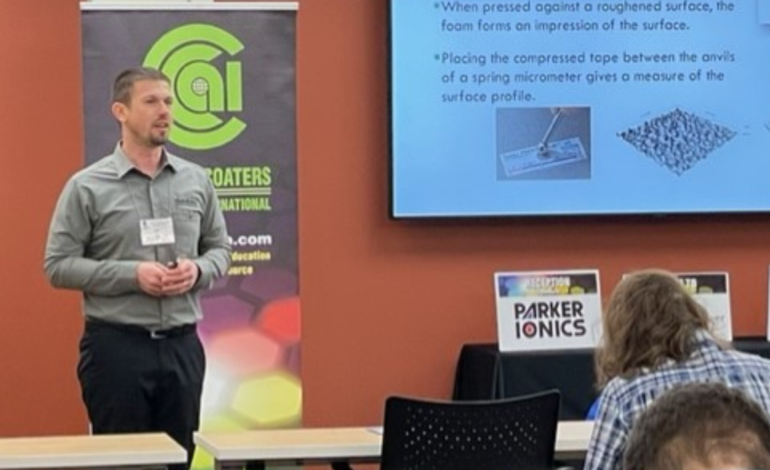
- Speaker or panelist in action
- Audience listening or reacting
- Members networking
- Hands-on demonstrations or activities
- Sponsor or exhibitor presence when appropriate
- Volunteers or chapter leaders working together
- A group photo
- Close-up details that help tell the story of the event
THE BEST TEST
“If someone saw this photo without any explanation, would it help them understand why they might want to participate next time?”
Give Yourself Variety
One photo of the speaker at the podium is useful. Twenty photos of the speaker at the podium are usually not.
Try to capture the event from several perspectives.
| Shot Type | What It Shows |
|---|---|
| Wide | The room, event scale, and overall atmosphere |
| Medium | Small groups, speakers, demonstrations, and networking |
| Close-Up | Expressions, details, hands-on work, signage, and personal moments |
| Posed | Leadership groups, volunteers, speakers, sponsors, and recognition |
| Candid | Genuine interaction, energy, and connection |
Smartphone Photos: Start With These Basics
Modern smartphones can take excellent event photos. A few small habits make a noticeable difference.
BEFORE YOU START
- Clean the camera lens
- Make sure you have enough storage space
- Turn on the camera grid if it helps you compose shots
- Check the room lighting before guests arrive
- Know who is responsible for taking photos
1. Move Closer Instead of Digitally Zooming
When possible, physically move closer to the subject. Heavy digital zoom can reduce image quality and make low-light photos look especially soft.
2. Tap to Focus
Tap the primary person or subject on your screen before taking the photo. This helps the camera focus and often improves exposure too.
3. Look for Better Light
Natural or even room lighting usually looks better than harsh direct flash. When possible, position yourself so the light falls onto people’s faces rather than directly behind them.
4. Hold the Phone Still
Low-light event spaces make movement more noticeable. Hold your phone with both hands when you can and take more than one frame of important moments.
5. Watch the Background
Before you take the photo, look behind the subject. Moving slightly to the left or right can remove distracting objects, empty space, clutter, or awkward signs.
THE EASIEST PHOTO UPGRADE
Take one second to look at the entire frame—not just the person in the middle.
Use Composition to Make Photos Feel More Intentional
SIMPLE COMPOSITION TIPS
- Use the grid: Place important subjects near the grid lines or intersections instead of always centering everything.
- Fill the frame: Get close enough that the people or activity are clearly the focus.
- Keep lines level: Watch walls, tables, presentation screens, and horizons.
- Capture layers: A speaker in the background with attendees in the foreground can make the viewer feel part of the room.
- Look for expressions: Smiles, concentration, laughter, conversation, and applause communicate more than empty-room shots.
- Take both vertical and horizontal photos: Different formats work better for different websites, emails, and social platforms.
Capture Short Video Clips Too
You do not need to film the entire event. A handful of short clips can give you enough material for social posts, recap videos, or future promotions.
EASY VIDEO SHOT LIST
- Guests entering or checking in
- A slow shot of the room or venue
- Speaker presenting
- Audience reaction or applause
- Members networking
- Hands-on activity or demonstration
- A quick volunteer or attendee comment
- Event signage or sponsor recognition
Keep Individual Clips Short
You often need only a few seconds of usable footage from each moment. Short clips are easier to edit together and make it easier to capture variety.
Think About Where the Video Will Be Used
Vertical video generally works well for short-form social content such as Reels and similar mobile-first formats. Horizontal footage may still be useful for websites, presentations, YouTube, or other widescreen uses.
If a moment is important and you have time, capture a version in both orientations.
Hold Each Shot Steady
Start recording, hold still for a few seconds, then stop. Constant panning and fast movement can make footage much harder to use later.
Capture People Talking
Short attendee comments can become especially useful content.
ASK THIS
“What brought you to today’s event?”
“What was your biggest takeaway?”
“Why would you recommend getting involved with the chapter?”
Remember Permissions and Member Comfort
Chapter photos should help members feel included—not uncomfortable.
Follow applicable AMPP guidance and event practices regarding photography, recording, releases, and attendee preferences. Be especially thoughtful when capturing close-up interviews or identifiable individuals for promotional use.
GOOD PRACTICE
- Let people know when you are taking a posed photo
- Ask before recording a close-up testimonial or interview
- Respect anyone who does not want to be photographed
- Follow applicable event and AMPP photo-consent guidance
- Do not publish images that could create privacy or safety concerns
Assign Someone to Capture Content
One of the biggest reasons chapters end up with no usable event photos is simple: everyone assumes someone else is taking them.
Make visual content an assigned event responsibility.
SIMPLE VOLUNTEER ROLE
Role: Event Content Volunteer
Goal: Capture a useful mix of event photos and short video clips.
Responsibilities: Follow the shot list, capture key moments, upload files after the event, and flag especially strong images for future promotion.
What to Do With the Photos After the Event
The value of your visuals increases when you intentionally reuse them.
ONE EVENT CAN SUPPORT
- A post-event thank-you post
- An event recap email
- A photo carousel
- A member spotlight
- A volunteer recognition post
- A sponsor thank-you
- A future event promotion
- A chapter newsletter
- Your chapter website or Community presence
- A year-in-review post
- Future chapter promotional materials
CONTENT MULTIPLIER
Do not post every good photo immediately. Save some of your best images for future communications.
Build a Chapter Photo Library
Photos are much more useful when future volunteers can actually find them.
Create a simple shared archive and organize event folders consistently.
SIMPLE FOLDER STRUCTURE
2026
↳ 2026-09-15 Technical Meeting
↳ Originals
↳ Best Photos
↳ Video Clips
Keeping a small “Best Photos” folder for each event makes it much easier for whoever handles social media, newsletters, or future event promotion.
Make Your Visuals More Accessible
When you publish images online, add useful alt text when the platform allows it. Alt text should briefly communicate the meaningful information in the image rather than simply saying “photo.”
ALT TEXT EXAMPLE
Instead of: “Chapter meeting photo”
Try: “AMPP chapter members gathered around a demonstration table during a technical meeting.”
Share Standout Chapter Moments With AMPP
Some of your strongest chapter visuals may also be useful beyond your local channels.
When you capture a great chapter moment, consider submitting it to AMPP so your chapter may have an opportunity to be featured in broader communications.
READY-TO-USE RESOURCE
10 Must-Have Shots + Smartphone Tips
Save AMPP’s photo quicksheet on your phone or share it with the volunteer responsible for capturing content at your next chapter event.
YOUR 30-SECOND EVENT PHOTO CHECK
Before the Event Starts
- Who is responsible for photos and video?
- Do they have the shot list?
- Is their phone charged?
- Do they have enough storage?
- Do they know which moments are most important?
- Do they understand applicable photo and recording expectations?
- Do they know where to upload the files afterward?
TRY THIS AT YOUR NEXT EVENT
Capture 10 Useful Photos Before You Worry About Perfect Photos
- Assign one person to capture content.
- Give them the 10-shot quicksheet.
- Capture wide, medium, and close-up photos.
- Take a mix of people, activity, details, and atmosphere.
- Capture several short video clips.
- Upload everything to the chapter archive after the event.
- Choose the best 10–20 images for future use.
What to Take Away From This
Your chapter does not need perfect photography to create useful visual content.
Assign someone to capture the event, give them a simple shot list, focus on people and moments that show real participation, and save the strongest visuals somewhere future chapter leaders can find them. A small library of authentic chapter photos can support months of stronger marketing.
AMPP CAN HELP
Have Great Chapter Photos to Share?
If your chapter captured a great event, member moment, volunteer activity, or industry experience, we’d love to see it. AMPP can also help if you have questions about chapter communications or making better use of your event content.
Email
chapters@ampp.org
.
We’re here to help.
What Are You Working On?
Explore more Lead & Succeed resources based on what your chapter needs right now.
Get More Chapter Leadership Resources
Subscribe to Lead & Succeed for practical ideas, templates, and resources designed to make chapter leadership easier.
We’re here to help you grow and strengthen your chapter.
If there’s a topic you’d like us to cover, let us know—we’re always looking for ways to better support AMPP chapter leaders.
.gif)